Building a REST API from Scratch: A Step-by-Step Guide
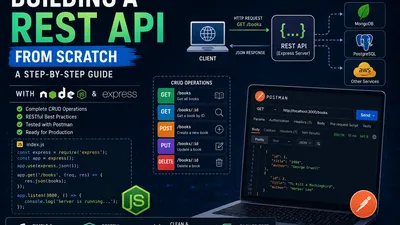
Whether you are building a mobile app, a single-page web application, or connecting microservices, REST APIs are the backbone of modern web communication. REST (Representational State Transfer) provides a simple, standardized way for clients and servers to talk to each other over HTTP.
But how do you actually build one?
In this guide, we will build a simple REST API from scratch using Node.js and the Express.js framework. We’ll build a "Bookstore" API where users can create, read, update, and delete (CRUD) books.
Prerequisites
Before we begin, make sure you have the following installed on your machine: 1. Node.js (v14 or higher) 2. A code editor (like VS Code) 3. A tool to test API requests, like Postman, Insomnia, or the VS Code extension Thunder Client.
Step 1: Project Setup
Let's get our project initialized and install the necessary packages.
-
Open your terminal, create a new folder, and navigate into it:
bash mkdir bookstore-api cd bookstore-api -
Initialize a new Node.js project:
bash
   npm init -y
This creates apackage.jsonfile to manage our dependencies. -
Install Express (our web framework):
bash npm install express -
(Optional but recommended) Install
nodemonas a development dependency. This automatically restarts your server when you save code changes:bash npm install --save-dev nodemon -
Open your
package.jsonand add a start script:json "scripts": { "start": "node index.js", "dev": "nodemon index.js" }
Step 2: Creating the Server
Create a file named index.js in the root of your project. This will be the entry point of our application. Let's set up a basic Express server:
const express = require('express');
const app = express();

// Middleware to parse incoming JSON requests
app.use(express.json());

// A simple test route
app.get('/', (req, res) => {
  res.send('Welcome to the Bookstore API!');
});

// Tell the server to listen on port 3000
const PORT = 3000;
app.listen(PORT, () => {
  console.log(`Server is running on http://localhost:${PORT}`);
});
Run your server using npm run dev. If you visit http://localhost:3000 in your browser, you should see the welcome message.
Step 3: Defining the Data (Mock Database)
In a real-world application, your data would live in a database like PostgreSQL or MongoDB. For this tutorial, we will use an in-memory JavaScript array to simulate a database.
Add this code below your middleware setup in index.js:
// Mock Database
let books = [
  { id: 1, title: '1984', author: 'George Orwell' },
  { id: 2, title: 'To Kill a Mockingbird', author: 'Harper Lee' }
];

// Variable to keep track of the next available ID
let nextId = 3;
Step 4: Implementing CRUD Operations
Now for the core of the API. We need to create routes that map to standard HTTP methods: GET, POST, PUT, and DELETE.
1. READ All Books (GET)
When a client requests the /books endpoint, we return the whole array.
// GET all books
app.get('/books', (req, res) => {
  res.json(books);
});
2. READ a Single Book (GET)
We need to find a book by its ID. The :id in the URL is a dynamic parameter.
// GET a single book by ID
app.get('/books/:id', (req, res) => {
  const bookId = parseInt(req.params.id);
  const book = books.find(b => b.id === bookId);

  if (!book) {
    return res.status(404).json({ message: 'Book not found' });
  }

  res.json(book);
});
3. CREATE a New Book (POST)
The client sends a JSON payload with the book details. We assign an ID and add it to our array.
// POST a new book
app.post('/books', (req, res) => {
  const { title, author } = req.body;

  // Simple validation
  if (!title || !author) {
    return res.status(400).json({ message: 'Title and author are required' });
  }

  const newBook = {
    id: nextId++,
    title,
    author
  };

  books.push(newBook);
  res.status(201).json(newBook); // 201 means "Created"
});
4. UPDATE an Existing Book (PUT)
We find the book by ID and update its properties with the data sent by the client.
// PUT (update) a book
app.put('/books/:id', (req, res) => {
  const bookId = parseInt(req.params.id);
  const { title, author } = req.body;

  const bookIndex = books.findIndex(b => b.id === bookId);

  if (bookIndex === -1) {
    return res.status(404).json({ message: 'Book not found' });
  }

  // Update the book, keeping old values if new ones aren't provided
  books[bookIndex] = {
    id: bookId,
    title: title || books[bookIndex].title,
    author: author || books[bookIndex].author
  };

  res.json(books[bookIndex]);
});
5. DELETE a Book (DELETE)
We filter the book out of the array.
// DELETE a book
app.delete('/books/:id', (req, res) => {
  const bookId = parseInt(req.params.id);
  const bookIndex = books.findIndex(b => b.id === bookId);

  if (bookIndex === -1) {
    return res.status(404).json({ message: 'Book not found' });
  }

  // Remove the book from the array
  books.splice(bookIndex, 1);

  res.status(204).send(); // 204 means "No Content" (successful delete)
});
Step 5: Testing the API
Your API is now complete! Let's test it using Postman or Insomnia.
- GET All: Send a
GETrequest tohttp://localhost:3000/books. You should see the two default books. - POST Create: Send a
POSTrequest tohttp://localhost:3000/books. Go to the "Body" tab, select "JSON", and enter:json { "title": "Dune", "author": "Frank Herbert" }You should get back the new book with anidof 3. - GET Single: Send a
GETrequest tohttp://localhost:3000/books/3to see your newly created book. - PUT Update: Send a
PUTrequest tohttp://localhost:3000/books/3with the body:json { "title": "Dune: Revised Edition" }The title updates, but the author remains. - DELETE: Send a
DELETErequest tohttp://localhost:3000/books/3. If you GET all books again, "Dune" will be gone.
Next Steps: Taking it to Production
Congratulations! You've built a functioning REST API from scratch. However, this is a learning prototype. Before deploying an API to production, you need to consider:
- A Real Database: Replace the in-memory array with a database. Use an ORM (Object-Relational Mapper) like Prisma or Sequelize for SQL, or Mongoose for MongoDB.
- Robust Validation: Instead of manual
ifstatements, use libraries like Zod or Joi to validate incoming request bodies. - Error Handling: Implement a global error handling middleware so your server doesn't crash when something unexpected happens.
- CORS (Cross-Origin Resource Sharing): If a frontend application on a different domain needs to use your API, you'll need to install and configure the
corspackage. - Authentication & Authorization: Secure your routes using JSON Web Tokens (JWT) or session cookies so only authorized users can create or delete books.
By mastering the fundamentals covered in this tutorial, you now have a solid foundation to explore these advanced topics and build robust, production-ready APIs.
Related Articles
Django vs FastAPI in 2026: Which Python Framework to Choose?
Aug 04, 2026
Firebase vs Supabase vs Convex (2025): Which Backend Should You Choose?
Jul 01, 2026
Razorpay Django Integration: Secure Payment Gateway with Signature Verification
Jun 29, 2026
Introduction to GraphQL: The Future of API Design
Jun 25, 2026