System Design 101: Scaling from 0 to 1 Million Users
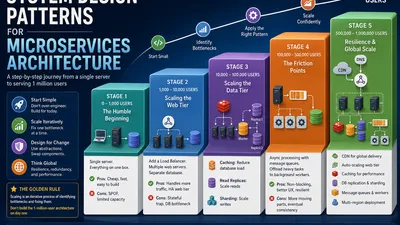
Every tech giant—Amazon, Netflix, Uber—started exactly where you are right now: with zero users and a single server.
The biggest mistake junior engineers make is over-engineering on day one. If you design a distributed, microservices architecture for an app with 100 users, you will burn through your startup capital and time before you even launch.
Scaling isn't about predicting the future; it’s about reacting to the present. In this guide, we will evolve a system step-by-step, fixing one bottleneck at a time, until we can confidently serve 1 million users.
Stage 1: The Humble Beginning (0 - 1,000 Users)
Keep it simple. Put everything on a single server. Your web server, application code, and database all live on one box.
graph TD
    Client --> WebServer[Web/App Server]
    WebServer --> DB[(Database)]

    style WebServer fill:#f9f,stroke:#333,stroke-width:2px
    style DB fill:#bbf,stroke:#333,stroke-width:2px
- The Pros: Incredibly cheap, fast to develop, easy to debug.
- The Cons: It’s a Single Point of Failure (SPOF). If the server crashes, the entire app goes down. If a viral post hits, your server runs out of CPU/RAM and dies.
Stage 2: Scaling the Web Tier (1,000 - 10,000 Users)
Your app is gaining traction. Your single server is maxing out its CPU because it's trying to handle incoming HTTP requests and run database queries simultaneously.
The Fix: Separate the Web and Database tiers, and add a Load Balancer.
Move your database to its own dedicated server. Then, add more web servers to handle the traffic, placing a Load Balancer in front to distribute requests evenly.
graph TD
    Client --> LB[Load Balancer]
    LB --> WebServer1[Web Server 1]
    LB --> WebServer2[Web Server 2]
    LB --> WebServer3[Web Server 3]

    WebServer1 --> DB[(Master Database)]
    WebServer2 --> DB
    WebServer3 --> DB

    style LB fill:#ff9,stroke:#333,stroke-width:2px
    style DB fill:#bbf,stroke:#333,stroke-width:2px
⚠️ The Stateful Trap: If a user logs in on Server 1, and their next request goes to Server 2, they will be logged out. You must make your web servers stateless. Move user sessions out of server memory and into a shared store like Redis.
Here is how you handle stateless sessions in code (using Node.js/Express as an example):
// ❌ BAD: Storing session in local server memory
// (Will break when Load Balancer moves user to a different server)
const session = require('express-session');
app.use(session({ secret: 'key', resave: false, saveUninitialized: true }));

// ✅ GOOD: Storing session in Redis (Shared across all web servers)
const RedisStore = require('connect-redis')(session);
const redisClient = require('redis').createClient();

app.use(session({
    store: new RedisStore({ client: redisClient }),
    secret: 'a_very_secure_key',
    resave: false,
    saveUninitialized: false
}));
Stage 3: Scaling the Data Tier (10,000 - 100,000 Users)
Your web tier can now handle massive traffic, but your single database server is gasping for air. It's overwhelmed by read and write queries.
Fix 1: Caching (The Read Fix) Most web apps are read-heavy (e.g., 80% reads, 20% writes). Implement a Cache Tier (Redis or Memcached). Check the cache first; if it's a miss, query the DB, store the result in the cache, and return it.
# Python pseudo-code for a Cache-Aside read operation
import redis
import psycopg2

r = redis.Redis(host='localhost', port=6379, decode_responses=True)

def get_user_profile(user_id):
    # 1. Check Cache First
    cached_user = r.get(f"user:{user_id}")
    if cached_user:
        return cached_user # Cache Hit! Fast return

    # 2. Cache Miss: Query the Database
    db_user = db.query("SELECT * FROM users WHERE id = %s", (user_id,))

    # 3. Save to Cache for next time (TTL of 1 hour)
    r.setex(f"user:{user_id}", 3600, db_user.to_json())

    return db_user
Fix 2: Read Replicas (The Database Read Fix) Even with a cache, the database gets hammered. We introduce Master-Slave Replication. The Master handles Writes, and data is copied to Read Replicas which handle Reads.
graph TD
    WebApp[Web Tier] -->|Writes| Master[(Master DB)]
    Master -->|Async Replication| Replica1[(Read Replica 1)]
    Master -->|Async Replication| Replica2[(Read Replica 2)]

    WebApp -->|Reads| Replica1
    WebApp -->|Reads| Replica2

    style Master fill:#f96,stroke:#333,stroke-width:2px
    style Replica1 fill:#bbf,stroke:#333,stroke-width:2px
    style Replica2 fill:#bbf,stroke:#333,stroke-width:2px
Fix 3: Database Sharding (The Write Fix)
Eventually, even the Master database will run out of capacity to handle writes. You must Shard (partition) your data. Users are divided across multiple database servers based on a "Shard Key" (e.g., user_id % number_of_shards).
# Simple sharding logic in Python
def get_db_shard(user_id):
    # Assuming 4 database shards (0, 1, 2, 3)
    shard_number = user_id % 4
    return connect_to_shard(f"db_shard_{shard_number}")
Stage 4: The Friction Points (100,000 - 500,000 Users)
Your app is now distributed. But with great distribution comes great latency and blocking operations.
Problem: Heavy Tasks Blocking the Web Servers A user uploads a video. Your web server has to compress it, which takes 5 minutes. The user's browser spins, and the server thread is blocked.
The Fix: Asynchronous Processing & Message Queues Introduce a message queue (RabbitMQ, SQS, Kafka). The web server offloads the heavy job to the queue and returns a "Processing!" response to the user instantly. A background worker picks up the job.
graph LR
    Client -->|1. Upload Video| WebServer
    WebServer -->|2. Send Job to Queue| MessageQueue[(Message Queue)]
    WebServer -->|3. Immediate Response: Processing!| Client
    MessageQueue -->|4. Consume Job| Worker
    Worker -->|5. Process & Save| Storage[(S3/DB)]

    style MessageQueue fill:#ff9,stroke:#333,stroke-width:2px
    style Worker fill:#9cf,stroke:#333,stroke-width:2px
# Producer (Web Server): Sending a job to the queue
import pika

def upload_video(user_id, video_file):
    # Save raw video to storage (e.g., S3)
    video_url = save_to_s3(video_file)

    # Push job to RabbitMQ
    connection = pika.BlockingConnection(pika.ConnectionParameters('localhost'))
    channel = connection.channel()
    channel.queue_declare(queue='video_processing')

    message = json.dumps({"user_id": user_id, "video_url": video_url})
    channel.basic_publish(exchange='', routing_key='video_processing', body=message)

    return {"status": "Your video is processing!"} # Return immediately!
Stage 5: Resilience & Global Scale (500,000 - 1,000,000 Users)
At this scale, things break constantly. Hard drives fail, servers reboot, network cables get cut. Availability is just as important as scalability. We add a CDN for static assets, multi-region deployment, and auto-scaling.
graph TD
    Client --> DNS
    DNS --> CDN[CDN: Static Assets]
    DNS --> LB[Load Balancer]

    LB --> AutoScaleGroup[Auto-Scaling Web Servers]

    AutoScaleGroup --> Cache[(Redis Cache)]
    AutoScaleGroup -->|Writes| Master[(Master DB)]
    AutoScaleGroup -->|Reads| Replicas[(Read Replicas)]
    Master --> Replicas

    AutoScaleGroup --> Queue[(Message Queue)]
    Queue --> Workers[Background Workers]

    style CDN fill:#9f9,stroke:#333,stroke-width:2px
    style AutoScaleGroup fill:#ff9,stroke:#333,stroke-width:2px
    style Queue fill:#f96,stroke:#333,stroke-width:2px
The Golden Rule of Scaling
Scaling is an iterative process of identifying bottlenecks and fixing them. Every solution introduces a new problem: * Caching introduces cache invalidation complexity. * Sharding makes cross-shard joins impossible. * Read replicas introduce eventual consistency.
Don't build the 1-million-user architecture on day one. Build for day one, but design your abstractions so that when the traffic hits, you can swap out the pieces without rewriting the whole application.