Mastering SQL Joins: Visual Explanation
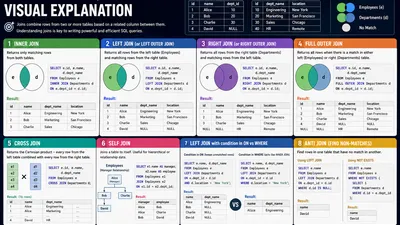
SQL Joins are the heartbeat of relational databases. If you can’t join tables, you can’t answer complex business questions. Yet, for many developers, joins remain a source of anxiety—often reduced to memorizing Venn diagrams that don't tell the whole story.
Venn diagrams are a decent starting point, but they hide the mechanics of how databases actually stitch rows together. In this guide, we will move beyond the circles. We’ll use visual data flows and concrete code examples to truly master SQL Joins.
The Setup: Our Data
To understand joins, we need data with a story. Let’s look at a typical e-commerce scenario: Customers and Orders.
Table: customers
| id | name |
| :--- | :--- |
| 1 | Alice |
| 2 | Bob |
| 3 | Charlie | (Charlie hasn't bought anything yet)
Table: orders
| id | customer_id | product |
| :--- | :--- | :--- |
| 101 | 1 | Laptop |
| 102 | 1 | Mouse |
| 103 | 2 | Keyboard |
| 104 | 99 | Monitor | (Orphan order: customer 99 doesn't exist)
1. INNER JOIN (The Matchmaker)
The INNER JOIN is the strict bouncer of SQL. It only lets rows through if they have a matching partner in both tables. If a customer has no orders, or an order has no valid customer, they are dropped.
The Visual:
graph LR
    C[Customers Table] -->|Only Matching Rows| R[Result Set]
    O[Orders Table] -->|Only Matching Rows| R
The Query:
SELECT c.name, o.product
FROM customers c
INNER JOIN orders o
  ON c.id = o.customer_id;
The Result: | name | product | | :--- | :--- | | Alice | Laptop | | Alice | Mouse | | Bob | Keyboard |
Notice what's missing: Charlie (no orders) and the Monitor (no customer).
2. LEFT JOIN (The "Keep Everything on the Left" Join)
A LEFT JOIN (or Left Outer Join) is like an INNER JOIN, but it is fiercely loyal to the left table. It keeps every row from the left table, regardless of whether it finds a match on the right. If it finds no match, it fills the right-side columns with NULL.
The Visual:
graph LR
    C[ALL Customers] -->|Keep ALL Left Rows| R[Result Set]
    O[Matching Orders] -->|Fill gaps with NULL| R
The Query:
SELECT c.name, o.product
FROM customers c
LEFT JOIN orders o
  ON c.id = o.customer_id;
The Result: | name | product | | :--- | :--- | | Alice | Laptop | | Alice | Mouse | | Bob | Keyboard | | Charlie | NULL |
Why use this? This is how you find "Customers who haven't made a purchase." (Just add WHERE o.id IS NULL at the end!).
⚠️ The #1 Left Join Trap: If you add
WHERE o.product = 'Laptop'to a Left Join, you accidentally turn it into an Inner Join! BecauseNULLis not equal to'Laptop', Charlie gets filtered out. If you want to filter the right table without dropping left rows, put the condition in theONclause:ON c.id = o.customer_id AND o.product = 'Laptop'.
3. RIGHT JOIN (The Flipped Left Join)
A RIGHT JOIN does exactly what a Left Join does, but it is loyal to the table on the right. It keeps all rows from the right table, filling left-side columns with NULL if there's no match.
The Visual:
graph LR
    C[Matching Customers] -->|Fill gaps with NULL| R[Result Set]
    O[ALL Orders] -->|Keep ALL Right Rows| R
The Query:
SELECT c.name, o.product
FROM customers c
RIGHT JOIN orders o
  ON c.id = o.customer_id;
The Result: | name | product | | :--- | :--- | | Alice | Laptop | | Alice | Mouse | | Bob | Keyboard | | NULL | Monitor |
Pro Tip: Any RIGHT JOIN can be rewritten as a LEFT JOIN by simply flipping the tables (FROM orders o LEFT JOIN customers c...). Most SQL developers stick to LEFT JOIN for consistency and readability.
4. FULL OUTER JOIN (The "Give Me Everything" Join)
A FULL OUTER JOIN is the union of a Left and Right join. It keeps every row from both tables. If it finds a match, it joins them. If it doesn't, it fills the missing side with NULL.
The Visual:
graph LR
    C[ALL Customers] -->|Keep ALL| R[Result Set]
    O[ALL Orders] -->|Keep ALL| R
The Query:
SELECT c.name, o.product
FROM customers c
FULL OUTER JOIN orders o
  ON c.id = o.customer_id;
The Result: | name | product | | :--- | :--- | | Alice | Laptop | | Alice | Mouse | | Bob | Keyboard | | Charlie | NULL | | NULL | Monitor |
Why use this? This is perfect for data reconciliation. You can use it to easily spot orphan records on either side of the relationship.
5. CROSS JOIN (The Cartesian Explosion)
A CROSS JOIN doesn't look for matching keys at all. It simply pairs every row in the first table with every row in the second table. There is no ON clause.
The Visual:
graph TD
    A1[Alice] --> B1[Laptop]
    A1 --> B2[Mouse]
    A1 --> B3[Keyboard]
    A1 --> B4[Monitor]
    A2[Bob] --> B1
    A2 --> B2
    A2 --> B3
    A2 --> B4
    A3[Charlie] --> B1
    A3 --> B2
    A3 --> B3
    A3 --> B4
The Query:
SELECT c.name, o.product
FROM customers c
CROSS JOIN orders o;
The Result: 3 Customers × 4 Orders = 12 Rows. (Alice-Laptop, Alice-Mouse, Alice-Keyboard, Alice-Monitor, Bob-Laptop, etc.)
Why use this? Generating combinations. If you have a sizes table (S, M, L) and a colors table (Red, Blue), a CROSS JOIN gives you every possible SKU (S-Red, S-Blue, M-Red, etc.). Be careful: doing this on large tables will crash your database.
6. SELF JOIN (The Mirror)
A SELF JOIN isn't a special keyword; it's just joining a table to itself. This usually happens in hierarchical data, like an organizational chart or a bill of materials.
Let's look at an employees table:
| id | name | manager_id |
| :--- | :--- | :--- |
| 1 | Alice | NULL |
| 2 | Bob | 1 |
| 3 | Charlie | 1 |
The Visual:
graph TD
    Employee[Bob] -->|Looks up manager_id| Manager[Alice]
The Query: To find out who Bob's manager is, we treat the table as two distinct virtual tables: the "Worker" table and the "Manager" table.
SELECT
    worker.name AS employee,
    manager.name AS manager
FROM employees worker
INNER JOIN employees manager
  ON worker.manager_id = manager.id;
The Result: | employee | manager | | :--- | :--- | | Bob | Alice | | Charlie | Alice |
(Alice is excluded because her manager_id is NULL, which fails the INNER JOIN condition).
The Master Cheat Sheet
Keep this mental model handy the next time you write SQL:
| Join Type | What it Returns | If No Match Found |
|---|---|---|
| INNER | Only matching rows from both tables | Rows are dropped |
| LEFT | All left rows + matching right rows | Right columns become NULL |
| RIGHT | All right rows + matching left rows | Left columns become NULL |
| FULL OUTER | All rows from both tables | Missing side becomes NULL |
| CROSS | Every combination of left x right | N/A (no ON clause) |
Final Performance Tip: Joins are only fast if the database can find the matching rows quickly. Always ensure you have an Index on the foreign key column (e.g., orders.customer_id) and the primary key column (e.g., customers.id). Without indexes, the database must perform a Nested Loop (scanning the whole second table for every row in the first table), which will bring your application to a halt.