Computer Networking Fundamentals for Interviews
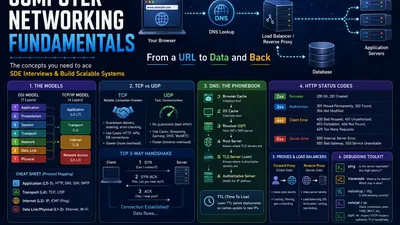
As a software engineer, you can write perfect code, but if you don't understand how that code communicates over the network, you can't debug production outages, design scalable systems, or pass your infrastructure interviews.
Networking questions in SDE interviews aren't about configuring Cisco routers. They are about understanding how data moves from a user's browser to your database and back.
Here is the definitive guide to the computer networking fundamentals you need to ace your interviews, complete with the mental models and diagrams interviewers love to see.
1. The Models: OSI vs. TCP/IP
Interviewers love asking "Which layer does X belong to?" You need to know two models: the theoretical 7-layer OSI model, and the practical 4-layer TCP/IP model (which is what the internet actually uses).
graph LR
    subgraph "OSI Model (Theoretical)"
        L7[7: Application]
        L6[6: Presentation]
        L5[5: Session]
        L4[4: Transport]
        L3[3: Network]
        L2[2: Data Link]
        L1[1: Physical]
    end

    subgraph "TCP/IP Model (Practical)"
        A[Application]
        B[Transport]
        C[Internet]
        D[Network Access]
    end

    L7 --> A
    L6 --> A
    L5 --> A
    L4 --> B
    L3 --> C
    L2 --> D
    L1 --> D
The Interview Cheat Sheet (Mapping Protocols to Layers): * Application (L5-7): HTTP, DNS, SSH, FTP, SMTP. (What the user/app interacts with). * Transport (L4): TCP, UDP. (How data is sent reliably or fast). * Internet/Network (L3): IP, ICMP (Ping). (Routing across the internet). * Data Link/Physical (L1-2): Ethernet, Wi-Fi, MAC addresses. (Moving bits on a wire).
💡 Common Trick Question: At which layer does a Load Balancer operate? Answer: It depends! L4 Load Balancers route based on IP and Port (Transport). L7 Load Balancers route based on HTTP headers/URLs (Application). L7 is more common today (Nginx, ALB).
2. TCP vs. UDP (The Most Asked Question)
The Transport layer is the heart of the interview. You must know the difference between these two.
TCP (Transmission Control Protocol): The reliable, connection-oriented protocol. * Guarantees: Delivery, ordering, and error-checking. * Use Cases: Web browsing (HTTP), APIs, database connections, file transfers. * The Catch: "Reliability" requires overhead. It is slower than UDP.
UDP (User Datagram Protocol): The fast, fire-and-forget protocol. * Guarantees: Nothing. No guarantee of delivery or order. * Use Cases: Video streaming, online gaming, DNS lookups, WebRTC. * The Catch: Packets can be lost or arrive out of order. The application must handle errors if it cares.
The TCP 3-Way Handshake
Before TCP sends data, it establishes a connection. You must know this sequence:
sequenceDiagram
    participant Client
    participant Server
    Client->>Server: SYN (Can I connect?)
    Server->>Client: SYN-ACK (Yes, can you hear me?)
    Client->>Server: ACK (Yes, I hear you!)
    Note over Client,Server: Connection Established! Data flows.
💡 Advanced Tip: Mention QUIC (HTTP/3). QUIC runs over UDP but builds reliability into the application layer. It solves TCP's "head-of-line blocking" problem. Mentioning QUIC shows you are up to date with modern web infrastructure.
3. DNS: The Phonebook of the Internet
When you type google.com, how does the browser find the server? The Domain Name System (DNS) translates human-readable hostnames into IP addresses.
The DNS Resolution Chain
- Browser Cache: Checked first.
- OS Cache: Checked next.
- Resolver (ISP): Your internet provider's DNS server.
- Root Server: Knows where the TLD (Top Level Domain) servers are (e.g.,
.com). - TLD Server: Knows where the Authoritative servers for
google.comare. - Authoritative Server: Holds the actual IP address for
google.com.
Interview Topic: TTL (Time To Live) DNS records have a TTL (e.g., 300 seconds). This tells ISPs how long to cache the IP address. * System Design Implication: If you are doing a blue/green deployment and switching IP addresses, you must lower your TTL hours before the switch. Otherwise, ISPs will cache the old IP and users will go to the dead server.
4. HTTP: The Language of the Web
Hypertext Transfer Protocol is the application layer protocol that drives the web.
HTTP Status Codes
You should know these by heart, grouped by the first digit: * 2xx (Success): 200 (OK), 201 (Created). * 3xx (Redirection): 301 (Moved Permanently - cached by browser), 302 (Found/Temporary), 304 (Not Modified - Cache hit!). * 4xx (Client Error): 400 (Bad Request), 401 (Unauthorized - not logged in), 403 (Forbidden - logged in but no access), 404 (Not Found), 429 (Too Many Requests - Rate limiting). * 5xx (Server Error): 500 (Internal Server Error), 502 (Bad Gateway - reverse proxy couldn't reach app), 503 (Service Unavailable - server is overloaded/down).
HTTP 1.1 vs HTTP/2 vs HTTP/3
- HTTP 1.1: Text-based. Only one request/response per TCP connection (unless using pipelining, which has issues). Leads to heavy TCP connection overhead.
- HTTP/2: Binary framing. Multiplexing allows multiple requests/responses over a single TCP connection simultaneously. Server Push.
- HTTP/3: Uses QUIC (UDP-based). Faster connection setup, eliminates Head-of-Line blocking at the transport layer.
5. Proxies & Load Balancers
These are the traffic cops of your architecture.
Forward Proxy: Sits in front of the client. * Purpose: Hides the client's identity. Used for bypassing geo-blocks (VPNs), corporate content filtering, and caching. * Analogy: You send your assistant to pick up lunch so the shop doesn't know you asked for it.
Reverse Proxy: Sits in front of the servers. * Purpose: Hides the server's identity. Used for Load Balancing, SSL Termination (decrypting HTTPS so the app servers don't have to), caching, and rate limiting. * Analogy: A receptionist at a large office building. You ask for "Sales," the receptionist routes you to an available salesperson.
graph LR
    Client[Client] -->|1| FP[Forward Proxy]
    FP -->|2| Internet
    Internet -->|3| RP[Reverse Proxy / Load Balancer]
    RP -->|4| S1[Server 1]
    RP -->|4| S2[Server 2]

    style FP fill:#ff9,stroke:#333
    style RP fill:#bbf,stroke:#333
6. The Debugging Toolkit (How to Sound Senior)
If an interviewer asks, "A user reports the API is slow. How do you debug the network?", don't just say "I check the code." Use these tools:
ping(ICMP): "Is the server reachable at all? Is there high latency?"traceroute/tracert: "Where is the latency happening? Which hop between me and the server is slowing down?"nslookup/dig: "Is DNS resolving correctly? Is the IP address pointing to the right load balancer?"netstat/ss: "Are my database connections maxed out? Are there ports inTIME_WAIT?" (TCP connections stay inTIME_WAITfor a bit after closing to ensure delayed packets are dropped. Too many means you're opening/closing connections too fast—use connection pooling!).curl -v: "Let me see the exact HTTP headers, redirects, and TLS handshake times."
The Ultimate Interview Pattern: The Full Request
Interviewers love the "Lifecycle of a Request" question. If you can map a URL press to a database response, you win.
Question: "What happens when you type www.example.com into your browser and press Enter?"
- DNS Lookup: Browser/OS checks cache, then queries DNS Resolver -> Root -> TLD -> Authoritative to get the IP.
- TCP Handshake: Browser initiates a 3-way handshake (SYN, SYN-ACK, ACK) with the server's IP at port 443.
- TLS Handshake: (If HTTPS). Client and server exchange certificates and cryptographic keys to establish an encrypted tunnel.
- HTTP Request: Browser sends an HTTP GET request (over the encrypted tunnel) with headers (User-Agent, Cookies).
- Load Balancer/Reverse Proxy: The request hits a reverse proxy (like Nginx or AWS ALB). It terminates TLS, checks the request, and routes it to a healthy application server.
- Application Logic: The app server parses the request, potentially queries a database or cache, and constructs the HTML/JSON.
- HTTP Response: The app sends an HTTP 200 OK back through the reverse proxy, down the TCP connection, to the browser.
- Rendering: The browser parses the HTML, discovers it needs CSS/JS/Images, and opens new connections to fetch them.
- Connection Teardown: When finished, the TCP connection is closed (or kept alive for reuse).
Master these concepts—the layer models, the TCP handshake, the role of DNS and Proxies, and the debugging tools—and you'll navigate any networking question an interviewer throws your way.