Meta-Agent-SDK: One Python Library to Rule Meta's Entire API Ecosystem
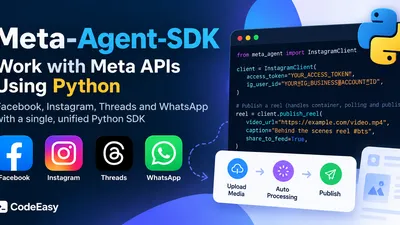
A hands-on look at a unified Python SDK for Facebook, Instagram, Threads, and WhatsApp
Introduction
If you've ever built an application that talks to Meta's platforms, you know the pain. Facebook has its Graph API, Instagram has its own flavor of the Graph API, Threads lives on a completely different domain (graph.threads.net), and WhatsApp Cloud API follows yet another set of conventions. Four platforms, four sets of authentication quirks, four different publishing workflows — and if you want your app to post everywhere, you're maintaining four integrations.
That's exactly the problem meta-agent-sdk, an open-source Python library by GitHub user Sam2445, sets out to solve. It's a typed, modern Python SDK that wraps Meta's entire Graph API ecosystem behind one clean, consistent interface.
In this article, we'll explore what the SDK offers, walk through real code examples, and assess whether it's ready for your next project.
What is Meta-Agent-SDK?
Meta-Agent-SDK is a Python library that provides a unified, typed interface for four Meta platforms:
| Platform | What You Can Do |
|---|---|
| Facebook Graph API | Manage Pages, publish Posts, upload Photos/Videos, handle Comments, read Insights |
| Instagram Graph API | Publish Photos, Reels, and Carousels with automated 2-phase publishing, manage Comments, read Insights |
| Threads Graph API | Post text/media threads, reply to threads, publish carousels, read Insights |
| WhatsApp Cloud API | Send text, template, interactive, and media messages; upload media; manage business profiles |
The key selling point is consistency. Instead of learning four different API dialects, you learn one Pythonic interface. Instead of hand-rolling HTTP requests and JSON parsing, you get typed response objects with IDE autocompletion.
The Headline Feature: Automated 2-Phase Publishing
If you've worked with the Instagram or Threads APIs, you know their most annoying quirk: you can't publish media in a single request. The official workflow looks like this:
- Create a media container (upload reference)
- Poll the container's status until Meta finishes processing
- Only then can you actually publish it
Getting this right means writing polling loops, handling timeout edge cases, and managing intermediate container IDs. Meta-Agent-SDK automates all of it:
from meta_agent import InstagramClient

client = InstagramClient(
    access_token="YOUR_ACCESS_TOKEN",
    ig_user_id="YOUR_IG_BUSINESS_ACCOUNT_ID",
)

# This one call handles: container creation → status polling → publish
reel = client.publish_reel(
    video_url="https://example.com/video.mp4",
    caption="Behind the scenes reel #bts",
    share_to_feed=True,
)
What would normally be 30–50 lines of request/retry/poll logic collapses into a single method call. That alone justifies the library's existence for many use cases.
Quickstart: Try It in 60 Seconds (No Credentials Needed)
One of the most developer-friendly things about this project is the offline demo. The repository ships with a mocked Meta Graph API server, so you can run a full end-to-end simulation — posting, commenting, replying — without a single access token:
git clone https://github.com/Sam2445/meta-agent-sdk.git
cd meta-agent-sdk

# Run the offline simulation
.venv/bin/python mock_demo.py
This is brilliant for learning the API surface before you ever touch real credentials.
For live execution against a real Facebook Page, configure a .env file:
FB_PAGE_ACCESS_TOKEN=your_facebook_page_access_token_here
FB_PAGE_ID=me
FB_API_VERSION=v21.0
Then run:
.venv/bin/python main.py
Tip: Generate a Page Access Token from the Meta Graph API Explorer with these permissions:
pages_manage_posts,pages_read_engagement, andpages_show_list.
Code Walkthrough: All Four Platforms
1. Facebook — Post, Comment, Reply, and Read
from meta_agent import FacebookClient

client = FacebookClient(access_token="YOUR_PAGE_ACCESS_TOKEN")

# Fetch page profile
page = client.get_page_profile(page_id="me")
print(f"Connected to: {page.name} ({page.followers_count} followers)")

# Publish a post
post = client.publish_post(
    page_id="me",
    message="Automated post via meta-agent SDK! 🚀",
    link="https://developers.facebook.com",
)

# Post a comment, then reply to it
comment = client.create_comment(
    object_id=post.id,
    message="Top-level comment on our post! 🎉",
)
reply = client.create_comment(
    object_id=comment.id,
    message="Threaded reply to the comment above! 🙌",
)

# Fetch the full comment thread
comments = client.get_comments(object_id=post.id, limit=10).collect_all()
for c in comments:
    print(f"[{c['id']}] {c.get('from', {}).get('name')}: {c.get('message')}")
Notice the .collect_all() pagination helper — no manual cursor handling.
2. Instagram — Photos, Reels, and Carousels
from meta_agent import InstagramClient

client = InstagramClient(
    access_token="YOUR_ACCESS_TOKEN",
    ig_user_id="YOUR_IG_BUSINESS_ACCOUNT_ID",
)

# Single photo
photo = client.publish_photo(
    image_url="https://example.com/photo.jpg",
    caption="Sunset views #photography",
)

# Carousel (2 to 10 items)
carousel = client.publish_carousel(
    items=[
        {"image_url": "https://example.com/slide1.jpg"},
        {"image_url": "https://example.com/slide2.jpg"},
    ],
    caption="Multi-image carousel post!",
)
3. Threads — Text and Media Posts
from meta_agent import ThreadsClient

client = ThreadsClient(access_token="YOUR_THREADS_ACCESS_TOKEN")

# Post a text thread
thread = client.publish_text_thread("Hello Threads from Python! 🧵")

# Reply to it
reply = client.reply_to_thread(thread_id=thread.id, text="Follow-up note.")

# Post an image thread
media = client.publish_media_thread(
    media_type="IMAGE",
    media_url="https://example.com/img.png",
)
4. WhatsApp — Messages with Interactive Buttons
from meta_agent import WhatsAppClient

client = WhatsAppClient(
    access_token="YOUR_WHATSAPP_TOKEN",
    phone_number_id="YOUR_PHONE_NUMBER_ID",
)

# Simple text message
client.send_text(to="15551234567", body="Your order has been shipped!")

# Interactive buttons for conversational flows
client.send_interactive_buttons(
    to="15551234567",
    body_text="Confirm your appointment?",
    buttons=[
        {"id": "btn_yes", "title": "Confirm"},
        {"id": "btn_no", "title": "Reschedule"},
    ],
)
Interactive WhatsApp buttons are a genuinely useful feature for building appointment confirmations, order updates, and support flows — and here it's just one method call.
Engineering Quality: What's Under the Hood
The project takes code quality seriously, with tooling already configured:
# Run the pytest test suite
.venv/bin/pytest

# Strict type checking
.venv/bin/mypy

# Linting
.venv/bin/ruff check
The src/ layout, pyproject.toml-based packaging, strict mypy enforcement, and included test suite signal that this was built with modern Python best practices in mind — not just slapped together over a weekend.
The Honest Assessment
No review would be complete without looking at both sides.
✅ Strengths
- True multi-platform coverage — very few libraries attempt Facebook + Instagram + Threads + WhatsApp together
- Automated 2-phase publishing — eliminates the most error-prone part of Instagram/Threads integrations
- Offline mock demo — learn the library with zero setup
- Typed responses — excellent IDE support and fewer runtime surprises
- Modern tooling — pytest, mypy, and ruff configured out of the box
⚠️ Things to Consider
- Early-stage project — the repository currently has only a couple of commits, no releases, and no community traction yet
- Limited documentation — the README is your primary reference; there's no dedicated docs site
- API version pinning — the demo uses
v21.0; always verify against Meta's current API version before deploying - No async support visible yet — worth checking the source if you need high-throughput async I/O
Should You Use It?
| Your Situation | Verdict |
|---|---|
| Learning Meta's APIs | ✅ Great — start with the mock demo |
| Building a prototype or side project | ✅ Solid choice |
| Multi-platform content automation tool | ✅ Strong fit — this is exactly its sweet spot |
| Mission-critical enterprise system | ⚠️ Evaluate carefully; consider pinning/forking the code or contributing improvements upstream |
Conclusion
Meta-Agent-SDK tackles a real, annoying problem: the fragmentation of Meta's API ecosystem. By unifying Facebook, Instagram, Threads, and WhatsApp behind one typed, Pythonic interface — and by automating the painful 2-phase publishing dance — it can save developers hours of boilerplate and debugging.
It's still a young project, so treat it the way you'd treat any early-stage open-source dependency: read the source (it's all there), run the tests, and pin your versions. But as a starting point for social media automation in Python, it's one of the most thoughtfully designed options available.
Get started here: github.com/Sam2445/meta-agent-sdk
Have you built something with Meta's Graph APIs? Tried this SDK? Share your experience in the comments below!
📝 Publishing Notes for CodeEasy.in
- Suggested meta description: "Meta-Agent-SDK is a unified Python library for Facebook, Instagram, Threads, and WhatsApp APIs. Learn how to automate posts, comments, and messages with clean, typed Python code."
- Suggested tags:
Python,Meta API,Facebook Graph API,Instagram API,WhatsApp Cloud API,SDK,Automation - Featured image idea: A diagram showing the SDK at the center with four platform logos branching out (Facebook, Instagram, Threads, WhatsApp)
- All code examples are taken directly from the project's README, so they should work as-is with the repo's demo setup