
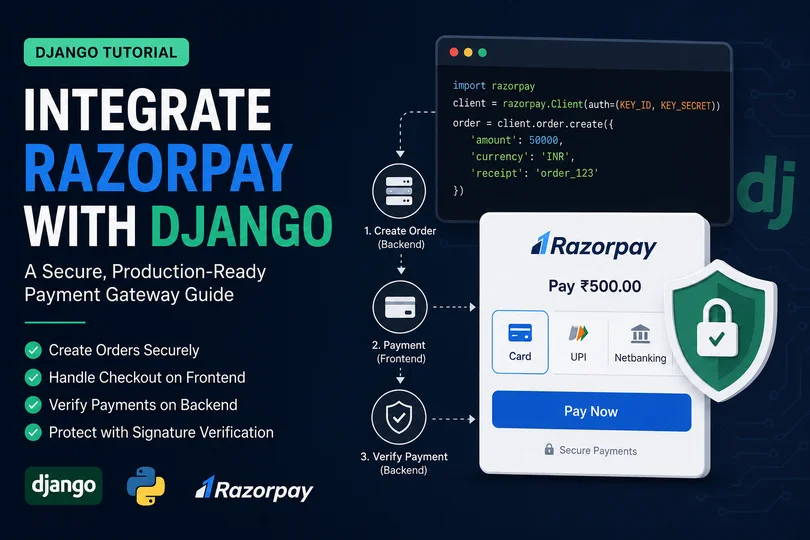
A checkout success callback is useful for updating the interface, but it is not proof that an order should be fulfilled. The browser can send arbitrary values to your Django endpoint. Your server must keep its own order record, verify Razorpay's signature against the order ID saved in that record, and confirm the payment is captured before granting access or shipping anything.
This is a focused implementation outline, not a drop-in production application. It assumes an authenticated customer, a server-side product catalog, Django's CSRF middleware, and a database order model. Adapt the fields, authorization, taxes, inventory, and fulfillment rules to your application. Test the entire flow with Razorpay test keys before enabling live payments.
1. Create the order on the server
Calculate the amount from your own product record. Do not accept a price or currency from the browser. Save a local purchase row that belongs to the current user, then create a Razorpay order for that exact amount and currency. Store the returned Razorpay order ID on the same row. Pass only the public key and that order ID to Checkout; keep the API secret on the server.
# Illustrative view: Purchase and Product are your own models.
from django.conf import settings
from django.contrib.auth.decorators import login_required
from django.http import JsonResponse
from django.shortcuts import get_object_or_404
from django.views.decorators.http import require_POST
import razorpay

@login_required
@require_POST
def create_payment_order(request, product_id):
    product = get_object_or_404(Product, pk=product_id, active=True)
    amount_paise = product.price_paise  # Read from the server-side catalog.
    purchase = Purchase.objects.create(
        user=request.user, product=product, amount_paise=amount_paise,
        currency="INR", status="pending",
    )
    client = razorpay.Client(auth=(settings.RAZORPAY_KEY_ID, settings.RAZORPAY_KEY_SECRET))
    gateway_order = client.order.create(data={
        "amount": amount_paise, "currency": "INR", "receipt": str(purchase.pk),
    })
    purchase.razorpay_order_id = gateway_order["id"]
    purchase.save(update_fields=["razorpay_order_id"])
    return JsonResponse({
        "purchase_id": purchase.pk,
        "razorpay_order_id": purchase.razorpay_order_id,
        "amount": amount_paise,
        "currency": "INR",
        "key": settings.RAZORPAY_KEY_ID,
    })
In a real implementation, handle an API failure so the pending local row can be retried or marked failed. Add an idempotency strategy for repeated clicks: otherwise one customer action can create several local and gateway orders. The checkout page must send Django's CSRF token with POST requests to your own views. @csrf_exempt is not appropriate for a normal browser callback to your Django site.
2. Verify the callback against your saved order
Checkout returns a payment ID, an order ID, and a signature. Retrieve the purchase by its local ID and current user. Compare the returned order ID with the one saved when you created the order. Pass the saved ID, the payment ID, and the signature to Razorpay's verification utility. Never use a browser-supplied order ID as the authority for this check.
# Illustrative verification core inside a CSRF-protected POST view.
purchase = Purchase.objects.get(pk=purchase_id, user=request.user)
if purchase.razorpay_order_id != data.get("razorpay_order_id"):
    return JsonResponse({"error": "Order mismatch"}, status=400)

client = razorpay.Client(auth=(settings.RAZORPAY_KEY_ID, settings.RAZORPAY_KEY_SECRET))
try:
    client.utility.verify_payment_signature({
        "razorpay_order_id": purchase.razorpay_order_id,
        "razorpay_payment_id": data["razorpay_payment_id"],
        "razorpay_signature": data["razorpay_signature"],
    })
except razorpay.errors.SignatureVerificationError:
    return JsonResponse({"error": "Signature mismatch"}, status=400)

payment = client.payment.fetch(data["razorpay_payment_id"])
if (payment["order_id"] != purchase.razorpay_order_id
        or payment["amount"] != purchase.amount_paise
        or payment["currency"] != purchase.currency):
    return JsonResponse({"error": "Payment details mismatch"}, status=400)
if payment["status"] != "captured":
    return JsonResponse({"status": "awaiting_capture"}, status=202)

# Mark the purchase paid and trigger fulfillment once, inside your own
# transactional state transition. Do not repeat fulfillment on retries.
Signature verification authenticates the returned identifiers; it does not by itself prove capture or authorize a different local purchase. Do not mark a purchase failed merely because one callback has an invalid signature: log the attempt and reconcile the genuine payment state separately. Do not return raw exceptions to the browser; log them server-side with sensitive values redacted.
3. Reconcile with webhooks
Browser callbacks can be lost when a tab closes or a network request fails. Configure a Razorpay webhook for payment state changes and verify its X-Razorpay-Signature using the raw request body and your webhook secret. A webhook endpoint is the exceptional case that cannot carry a Django browser CSRF token; its signature check is mandatory. Record x-razorpay-event-id to ignore duplicate deliveries. Events can arrive out of order, so transition to paid only after confirming the payment, purchase ID, amount, currency, and captured status. Make fulfillment idempotent and perform it once after the database state transition.
Before launch, test successful and failed payments, repeated callbacks, duplicate webhooks, an altered order ID, an altered amount, a delayed capture, and an unavailable Razorpay API. Check the Razorpay dashboard and your own order records for agreement. Keep key secrets out of the repository and logs.
Razorpay's Python integration steps explain order creation, signature verification, and capture status. Its webhook validation guide covers raw-body signature validation and duplicate events. Django's CSRF guide shows how to protect your browser POST requests.